FORUM PEOPLE. BLOG PEOPLE. YOUR PEOPLE.

Good posts.
Great company.

There’s nothing quite like a forum that feels alive.
A place for community owners, thoughtful writers, and people who give you a reason to come back.

↔ A community effort. A little give. A little get.

A GOOD CONVERSATION GOES A LONG WAY
JJamieWeekend Workshop#01

Anyone else still fixing things
instead of replacing them?

DIY & makingStart a conversation ↗
MMorgan ✓Joined the conversation↳

Absolutely. My favourite chair is on its third repair. There’s a story in keeping it going.

♡ That’s what communities are for.
✓
A good post. A little reward.Write. Earn credits. Keep it going.
+10credits
FOR THE PEOPLE WHO STILL LOVE A GOOD CONVERSATION.

How reserving writer slots on Postloop works.

Shortie's Avatar
Shortie · in News & Announcements
0 replies 33 views

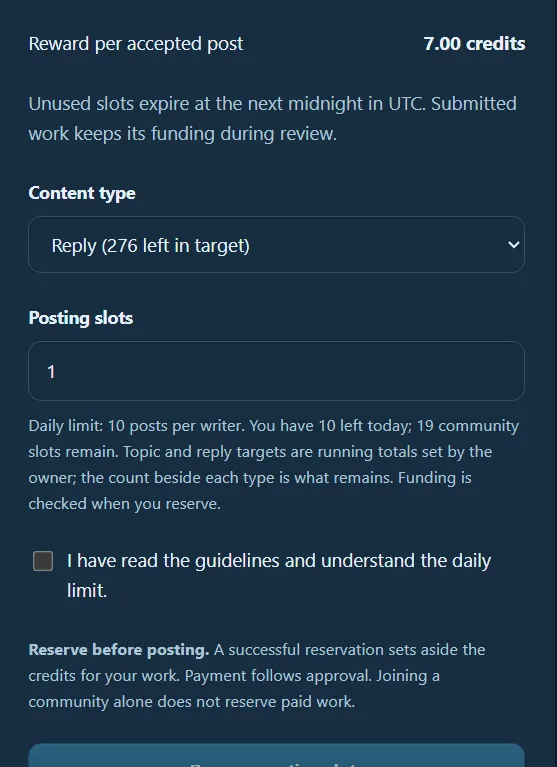
On Postloop, you will see an allocation like this for each site you are working on. The amount will be different for each site, depending on how much new content the site owner wants each day.

For this example, the site owner has allocated 10 posts or threads per writer.

You can choose how you want to use your allocation by selecting either Reply or Topic from the dropdown menu and then choosing how many you would like to reserve.

For example, if you wanted to make 5 threads and 5 replies:

  1. Select Topic from the dropdown menu.

  2. Enter 5 in the quantity box.

  3. Reserve those 5 topics.

  4. Then select Reply from the dropdown menu.

  5. Enter 5 in the quantity box.

  6. Reserve those 5 replies.

You have now used your full allocation of 10 pieces of content for that day, 5 topics + 5 replies.

You don't have to split them 5 and 5. You can choose the combination that works best for you, as long as you stay within the site's daily allocation.

I've also added a screenshot of this section so you can see exactly which area I'm referring to. Hopefully this makes it a little easier to understand! 😊

Theme: Postloop